
Unlike photography, where a single shutter click captures a single image, video is a sequence of individual frames played in rapid succession to create the illusion of motion. This is why filmmaking has historically been known as “motion picture.”
Frame rate plays a crucial role because the total number of frames captured each second significantly influences the final look of your video.
In this post, we’ll explore the importance of frame rate, the common frame rates you’ll encounter, and how they affect everything from motion portrayal to slow-motion effects.
Let’s dive into the world of frame rates and discover how they can enhance your video!
Understanding Frame Rate: What Is It?
Frame rate refers to the number of individual frames captured in one second of video. It’s a fundamental concept that determines how motion is represented in your footage. Think of it as the speed at which your camera is capturing and displaying images.
In filmmaking, each frame is a still image, and when these frames are played back quickly, they create the illusion of continuous motion.
This is where the term “motion picture” originates. The frame rate you choose can greatly impact the viewer’s experience, affecting how smooth or choppy the movement appears on screen.
- Why It Matters: Understanding frame rate is essential for any content creator looking to control the look and feel of their videos. By mastering this concept, you’ll be better equipped to make informed choices about your shooting settings and achieve the desired aesthetic for your projects.
- Tip: Always consider the frame rate before you start shooting. Knowing how it affects motion portrayal will help you set your camera for the best results.
Common Frame Rates
There are three common frame rates that most cameras have by default: 24 frames per second (FPS), 30 FPS, and 60 FPS.
Each of these frame rates has its unique characteristics and applications, making them essential to understand as you develop your filming skills.
This in-depth guide on Common Video Frame Rates: 24, 30, and 60 FPS Explained provides more details on when and how to use each.
1. 24 Frames Per Second (FPS)
24 Frames Per Second (FPS) is the industry standard, especially in Hollywood films. This frame rate captures 24 individual frames for every second of footage, closely mimicking how our eyes perceive motion in real life.
Anything below 24 FPS can create a noticeable choppiness, resulting in an unnatural look that can be distracting to viewers. It’s no wonder this frame rate is favored for cinematic storytelling.
2. 30 Frames Per Second (FPS)
30 Frames Per Second (FPS) is often a point of confusion for many content creators. While it offers six additional frames per second compared to 24 FPS, making the footage look slightly smoother, it still doesn’t provide the same cinematic quality.
However, many modern content creators appreciate this smoother aesthetic, which has led to a shift in some communities toward filming in 30 FPS.
3. 60 Frames Per Second (FPS)
60 Frames Per Second (FPS) is the go-to choice for capturing slow motion. With 60 frames in a single second, this frame rate allows you to create incredibly smooth slow-motion footage when interpreted down to 24 FPS.
This capability opens up a world of creative possibilities, enabling you to portray action in a way that captivates your audience.
- Why It Matters: Understanding these common frame rates and their implications is crucial for making the best choices in your video making journey. Each frame rate serves a purpose and can dramatically influence the emotional impact of your footage.
- Tip: When choosing a frame rate, consider the style of your project. If you’re aiming for a cinematic feel, opt for 24 FPS; for smoother action or vlogs, 30 FPS may work well; and for epic slow motion, 60 FPS is your best bet.
Slow Motion: The Magic of Higher Frame Rates
One of the most exciting benefits of shooting at higher frame rates, such as 60 frames per second (FPS), is the ability to create stunning slow-motion footage.
By capturing more frames within each second, you gain the flexibility to stretch that footage out over time, resulting in beautifully smooth slow motion that enhances your storytelling. If you’re using a smartphone, this guide explains how to achieve stunning slow-motion shots.
When you shoot at 60 FPS and then slow the footage down to 24 FPS, you effectively have 2.5 seconds of slow-motion action from just one second of captured footage.
This is possible because each frame from the original recording is stretched to fit within the new frame rate, allowing you to interpret the footage in a way that maintains smooth motion without any jarring gaps.
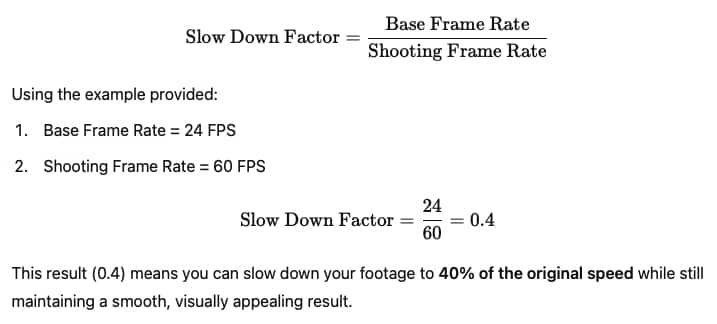
To determine how much you can slow down your footage, use a simple formula: divide the base frame rate of 24 FPS by the frame rate you shot in.
For example, with 60 FPS footage, dividing 24 by 60 gives you 0.4, meaning you can slow it down to 40% of the original speed while still achieving a fluid visual experience.
If you really want to push the boundaries of slow motion, consider shooting at 120 FPS or even higher. This allows for even more dramatic slow-motion effects, letting you capture intricate details that would otherwise go unnoticed.
However, it’s essential to keep in mind that if you slow down your footage too much, you may end up seeing the gaps between frames, leading to an undesirable viewing experience.
- Why It Matters: The ability to create slow motion adds a powerful tool to your storytelling arsenal, allowing you to highlight moments and emotions that might otherwise be missed.
- Tip: When filming for slow motion, always shoot at a higher frame rate to ensure you have enough frames to maintain smooth motion when slowed down.
Common Mistakes in Frame Rate Selection
When it comes to frame rate selection, many beginners make crucial mistakes that can affect the quality of their videos.
One of the most common errors is attempting to slow down footage captured at 24 or 30 frames per second (FPS).
While slowing down footage can create dramatic effects, using standard frame rates can lead to choppy and unnatural motion, which is not true slow motion.
For instance, if you film at 24 FPS and decide to slow the footage down to 40%, you might notice that the resulting video lacks the smoothness expected from a slow-motion shot.
This is because the original footage wasn’t recorded at a high frame rate, causing gaps between frames that become evident to viewers. The key takeaway is to never slow down 24 FPS footage, as it won’t yield the desired effect.
- Why It Matters: Being aware of these common mistakes can save you time and frustration in post-production. Understanding the limitations of your frame rates ensures that you achieve the quality you desire.
- Tip: Always shoot at higher frame rates, like 60 FPS or above, if you plan to incorporate slow motion. This will give you the necessary frames to maintain quality.
To avoid this pitfall, always aim to shoot at a higher frame rate if you plan to include slow-motion sequences in your projects.
Filming in 60 FPS or higher ensures that you have enough frames to work with, allowing for a smooth slow-motion interpretation without those distracting pauses between frames.
Understanding these common mistakes and how to avoid them will help you elevate your video production quality. By selecting the appropriate frame rate for your footage, you can achieve the professional results you’re aiming for.
The Versatility of Frame Rates
The beauty of frame rates lies in their versatility, allowing content creators to adapt their filming techniques to different scenarios.
If you’re unsure which clips will be slow motion and which will remain at regular speed, there’s a simple solution: film everything at 60 frames per second (FPS).
This approach provides flexibility during the editing process, enabling you to decide in post-production which clips to slow down and which to keep at normal speed.
When you shoot at 60 FPS and import your footage into a 24 FPS editing timeline, the editing software automatically hides the extra frames.
This means that your 60 FPS footage will visually resemble 24 FPS, maintaining a cinematic quality while allowing you to use those hidden frames for slow-motion effects. It’s a clever trick that ensures a seamless viewing experience without any jarring transitions.
- Why It Matters: Filming at a higher frame rate not only enhances your editing options but also helps you avoid potential pitfalls associated with frame rate mismatches.
- Tip: When shooting, if you anticipate needing slow-motion footage, it’s often best to stick with 60 FPS for greater editing flexibility.
On the other hand, if you were to shoot at 30 FPS and drop that footage into a 24 FPS timeline, the hidden frames would create uneven gaps, resulting in a jittery playback.
This difference can be noticeable and is a common beginner mistake that can detract from the overall quality of your video.
By understanding how to use frame rates effectively, you can enhance your editing workflow and ensure your videos look polished.
Shooting at 60 FPS gives you the best of both worlds, allowing you to capture smooth regular motion and create stunning slow-motion sequences, all while keeping your editing process streamlined.
Conclusion
Understanding frame rates is crucial for anyone involved in video production, as they significantly influence the quality and style of your footage.
The industry standard of 24 frames per second (FPS) offers a cinematic feel, making it the go-to choice for narrative and cinematic storytelling.
Meanwhile, 30 FPS provides a slightly smoother look that some content creators prefer, while 60 FPS unlocks the magic of slow motion, allowing you to capture and interpret action in captivating ways.
By mastering these frame rates and their implications, you’ll be better equipped to make informed decisions about your filming and editing processes.
Remember to shoot at higher frame rates if you plan to include slow-motion sequences, and avoid slowing down footage shot at lower frame rates to maintain a professional appearance.
Ultimately, choosing the right frame rate will depend on your specific needs, the type of content you’re creating, and your audience’s expectations.
With this knowledge, you can confidently experiment with frame rates, enhancing the overall quality and impact of your video projects. Happy filming!